sales@officechairatwork.com

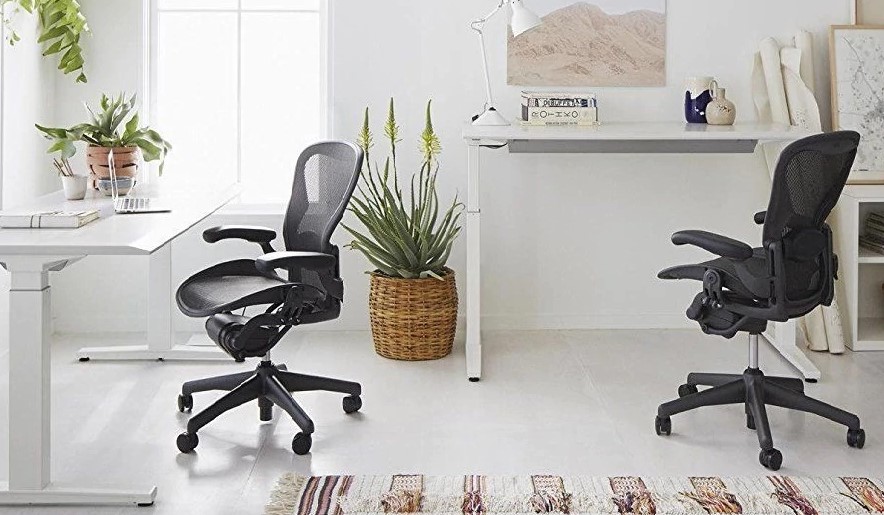
The iconic Herman Miller Aeron Chair comes with many different features, choices, sizes, and add-ons.
Deciding what type of Aeron chair to purchase can be a difficult.
We put together an extensive guide to help you choose the Aeron chair that is right for you.
The first thing you need to ask yourself is how exactly do you intend to use the Aeron chair.
Designers Don Chadwick and Bill Stumpf have focused to build a chair that is excellent for sitting many hours at work, but every person sits differently.
Herman Miller Aeron comes in three different sizes, A, B, and C, in order to meet the needs of every body type.
So, I am sure you are asking yourself: “How do I know what size Aeron I need?”
The answer is simple and straightforward.
The most popular Aeron size is B as this chair meets the needs of the majority of office workers.
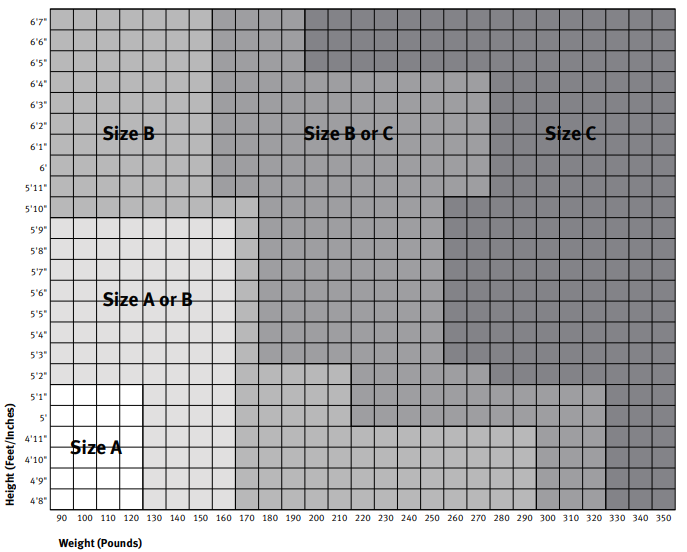
Choose Size B if you weigh between 90 pounds and 320 pounds or your height is between 4 feet 8 inches and 6 feet 7 inches
Choose Size C if you weigh more than 160 pounds or your height is more than 4 feet 8 inches
Choose Size A if you less than 170 pounds or your height is less than 5 feet 10 inches
You will notice that there is a lot of overlap in the sizes mentioned above. Please refer to the following size chart you will see that as you scale up in height and or weight, it will be possible that 2 sizes would be a great fit for you.
Now that you know what size Aeron you need, let’s move on to the headrest add-on.
If you spend a considerable amount of time sitting in your chair while looking straight or up at a computer screen or presentation, consider adding a headrest.
With the Herman Miller Aeron headrest, you will be able to rest your head while looking at your computer screen or any other presentation.
This will prevent and relieve the pressure placed on your head, reducing the chances of headaches.
If you mainly spend your time at the office looking down at your desk, no headrest will be needed.
Herman Miller Aeron offers many different choices for back support.
The choices are no lumbar, adjustable lumbar support, adjustable posturefit.
If you do not usually recline on your chair or use the back support while working, consider purchasing the simple no lumbar chair.
When leaning forward during office tasks, there is no need for the chair to have a specialized back support system.
If you do recline or lean back at work, consider adding an adjustable lumbar support, either the adjustable lumbar pad or adjustable posturefit.
The adjustable lumbar pad or adjustable posturefit provides support for your back at the precise location that you need it.
When it comes to the Aeron chair seat you can choose a standard tilt or tilt limiter and seat angle.
If you sit on your office chair for less than an hour at a time, you will be fine with the standard seat tilt.
However, if you sit on your Aeron chair for many hours at a time, you should get the tilt limiter and seat angle add-on.
This will allow you to adjust the angle of the seat and lock it into position to relieve the pressure placed on your back and legs.
Consider adjusting the seat angle every hour to prevent leg numbness and back pain.
When it comes to arms, Herman Miller offers no arms, stationary arms, height adjustable arms, and fully adjustable arms.
If you don’t usually rest your arms while sitting in your Aeron, you might not need armrests at all.
Otherwise, if you would like to rest your arms, the stationary arms remain in a fixed position at all times and are not adjustable at all.
If you would like to rest your arms at different height levels, consider getting the height adjustable arms, which can be locked into position at various height levels.
If you want to rest your arms at different height levels and positions, consider buying the fully adjustable arms, which could be adjusted up and down and in and out (left and right).
You could also add to luxury upgrades to your Aeron chair.
Herman Miller Aeron offers leather arms.
If you move around the office with your chair often, consider adding the quiet roll casters for quietly moving your chair from desk to desk without disrupting your colleagues at work.
The Quiet Roll Casters Soft Rollerblade Wheels makes no noise no matter what type of surface the chair rests on.
Buy an Aeron chair here.